
Why Your Town Needs to Be Written on Your Website (Local SEO for Trades)
Your town needs to be written in plain text on your website because search engines and customers read words, not maps or logos. Put your trade and town in the first line, the page title, the footer and your contact page, and add a short list of the areas you cover. Write it once in each place, naturally.
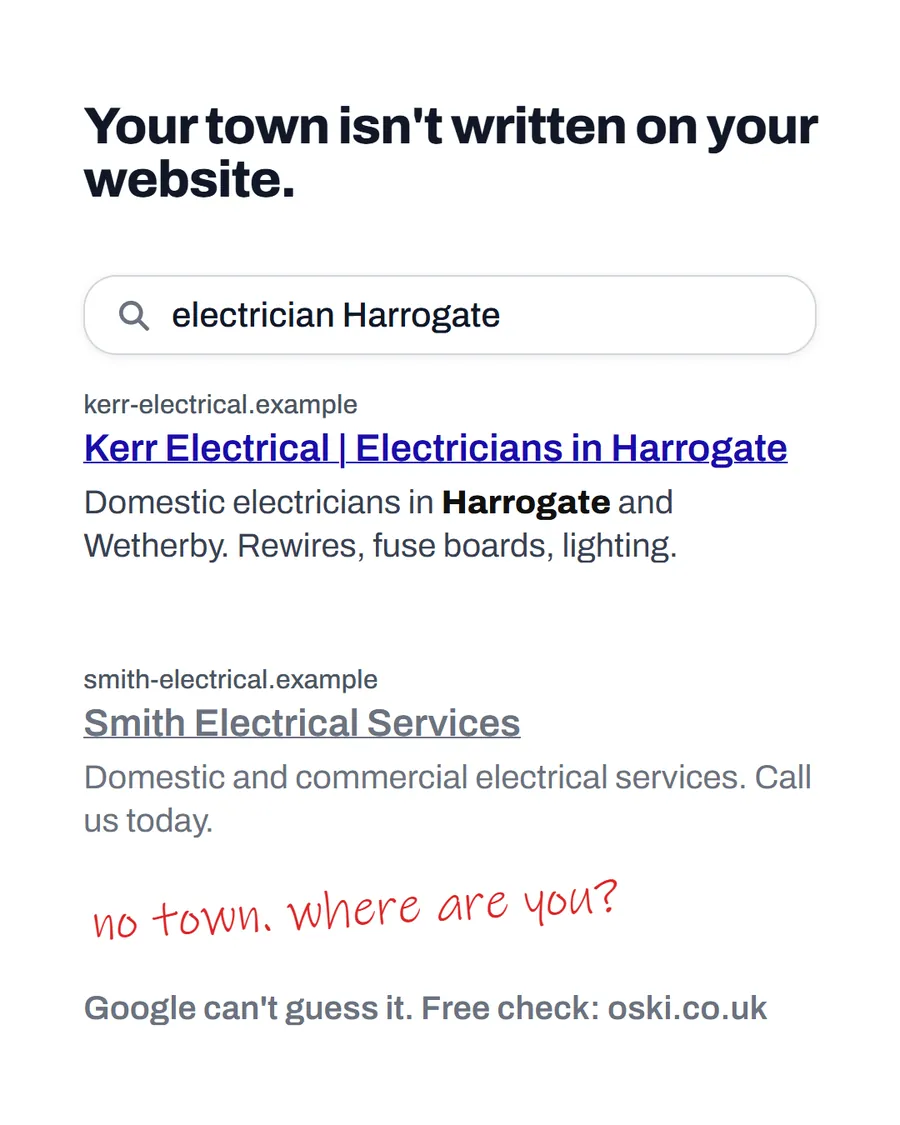
The ad at a glance
| Question | Answer |
|---|---|
| Who it is for | Trades and local service firms whose website never says where they work, because the owner assumes everyone knows. |
| What it shows | A search for "electrician Harrogate" with two results. One names Harrogate in the title and snippet. The other, "Smith Electrical Services", does not, and a handwritten note says "no town. where are you?" Both firms are examples. |
| Where it applies | Across the UK, with a focus on London and the South East, where we are based. It is aimed at small local businesses wherever customers search for them. The example firm in the ad is set in Harrogate, and the same advice applies in any town. |
| Why we published it | It is a two-minute fix that many sites miss, and it shows owners exactly what a customer and a search engine read. |
Why does the town matter so much?
Because "near me" searches depend on matching. Someone typing "electrician Harrogate" is asking for electricians linked to Harrogate. Google's guidance on local ranking says local results are mainly based on relevance, distance and prominence, where relevance is how well a profile matches what someone is searching for, and it advises giving complete and detailed business information.
A website that never names a town gives that process very little to work with. The same applies to customers, who skim for a place name as quickly as a search engine does. If they cannot see yours, they assume you do not cover them.
Where should you write the town?
Put it where it will be read and where it makes sense. Not every spot needs it.
| Place | Example | Why |
|---|---|---|
| Homepage first line | "Electricians in Harrogate and Wetherby" | Customers see it immediately |
| Page title | "Electricians in Harrogate | Business Name" |
| Footer | Address, area and phone number | It appears on every page |
| Contact page | Address, service area, hours | Customers check it before ringing |
| Service pages | "Fuse board upgrades in Harrogate" | Matches specific searches |
| Image captions | "Rewire in Wetherby" | Adds real context |
Google's SEO starter guide says titles should be clear, concise and accurate, and that a title for a local business can include details such as its location. Its image guidance recommends placing images near relevant text and using informative alt text, which is a natural place to mention the job and area.
How do you avoid overdoing it?
Write for people first. A page that repeats "Harrogate electrician Harrogate" in every sentence reads badly and does nothing for you. Say it once clearly where it matters, then write normally.
If you cover several towns, do not paste the same text with the town name swapped. Search engines and customers can tell. Give each main area a short section with something real: a type of job you have done there, how quickly you can reach it or a nearby landmark. Our guide to service area pages for trades explains how to do that without repeating yourself.
What about areas you serve but are not based in?
List them in a clear sentence, such as "We cover Harrogate, Wetherby, Knaresborough and Ripon". Keep the list to places you genuinely travel to for work. If a customer in an outlying village sees their name, they know you will come. If a place is on the list but you never go, you waste your time and theirs.
Make sure the same area is described the same way on your Google profile and other listings. Our post on local citations and consistent details explains why a mismatch hurts.
Does it help to add technical markup?
It can. Structured data lets you describe your business, address and service area in a form search engines read directly, which complements the visible text. It does not replace plain words on the page, though, so write those first. Our guide to structured data for small businesses covers when and how.
What does a good local homepage look like?
Here is a before and after for an example heating firm.
| Homepage opening | |
|---|---|
| Before | Welcome to our website. We offer a wide range of heating and plumbing services to meet your needs. |
| After | Boiler repairs and servicing in Croydon and South London. Gas Safe registered. We cover Croydon, Sutton, Purley and Streatham. |
The second version names the trade, the main town and the wider area in the first two sentences, and it does so in words a customer would use. It does not repeat the town ten times. It says it clearly once and lists the nearby places in a sentence a person can read.
How do you check it has worked?
Search for your trade and town on your phone and see where you appear. Then look at your own result: does the title mention the town, and does the description read like something a customer would click? Google says the performance report for a verified Business Profile lists the search terms people used to find you, so check there each month for the places and phrases customers use. If a nearby town you want work in never appears, it is a prompt to add a short section about it.
Do not expect overnight changes, and be wary of anyone who promises a ranking. Local results depend on many things, and the best you can do is give clear, accurate information.
What to do this week
- Open your homepage and check whether your trade and town appear in the first line.
- Look at your page title in the browser tab and search result, and add the town if it is missing.
- Check your footer and contact page for a written address, service area and phone number.
- Write one sentence listing the areas you genuinely cover and add it to the homepage.
- If you want us to review your local pages, send us your web address.
Frequently asked questions
Why does my town need to be on my website?
Because search engines and customers read the text on your page. If your trade and town are not written there, a search for 'electrician Harrogate' has little to match. Google also says local results depend on relevance, so clear, detailed information helps.
Where should I put my town on my website?
In the first line of the homepage, the page title, the footer, your contact page and a short list of areas you cover. Add it to image captions where it fits naturally. Avoid repeating it in every sentence.
How many towns should I list?
List the ones you genuinely cover and want work in. If you cover several main areas, give each a short section or page with real details. A long list of towns with nothing behind it looks thin to customers and to search engines.
Is it enough to have my address on a map?
No. A map is a picture, and the text around it is what search engines and many visitors read. Put your service area in words as well, near the top of the page and in the footer.