What Does a Homepage Mark-Up Cover? The Checks We Run on a Trade Website
A homepage mark-up is your homepage read the way a customer reads it, with notes in the margin: what is unclear, what is missing and what to change first. We check eight things in the order a visitor meets them, from the first line to the phone button, and send back a short list of fixes.
The ad at a glance
| Question | Answer |
|---|---|
| Who it is for | Owners of trade and local service businesses who suspect their website is losing enquiries but cannot say why. |
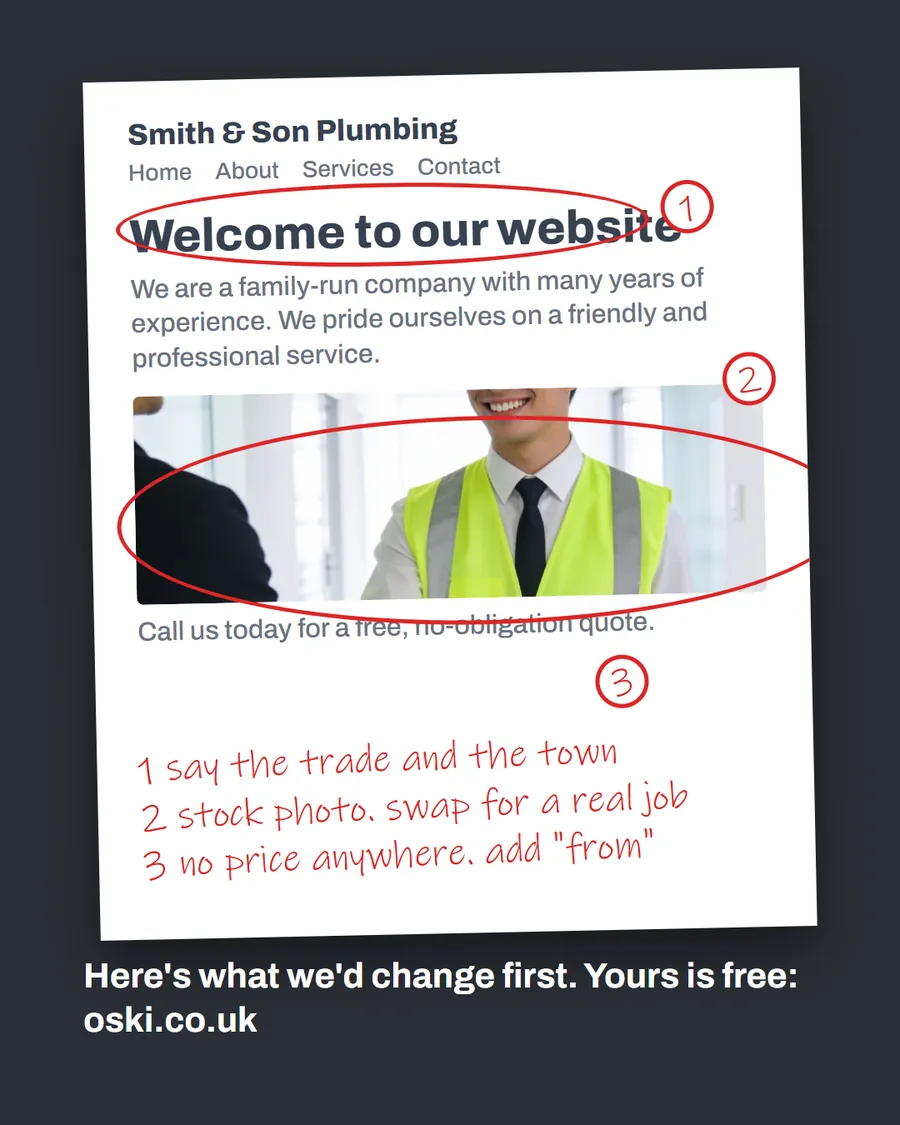
| What it shows | A printed homepage with red-pen circles and numbered notes: say the trade and the town, swap the stock photo, add a "from" price. The page itself is an example, not a client's site. |
| Where it applies | Across the UK, with a focus on London and the South East, where we are based. It is aimed at small local businesses wherever customers search for them. |
| Why we published it | People understand a service when they can see the output. A marked-up page shows exactly what we would send you. |
What do we check first on a homepage?
Eight checks, in the order a customer meets them. Each one has a single question behind it.
- The first line. Does it say what you do and where, in words a customer would use?
- The main photo. Is it your work, your van or your team, or is it stock?
- The price. Is there a starting price or a clear explanation of how you charge?
- The proof. Is there a registration number, a guarantee or reviews a visitor can check?
- The contact route. Is there a number that can be tapped and a second way to get in touch?
- The area. Is your town or region written in plain text, not only in a map or an image?
- The mobile view. Does everything above work on a phone, one-handed?
- The title and description. What will someone see in the search result before they click?
We go into the first of these in what the first line of your homepage should say and the full copy formula in how to write a homepage that gets calls.
How do we read the page like a customer?
We open it on a phone first, because that is where many trade searches happen. Then we ask what a stranger would think in the first few seconds: can I tell what this firm does, where it works and how to reach it? We read it again as someone comparing two firms, with a competitor's page in the next tab.
We also read it as someone in a hurry. A person with a leaking tap does not read paragraphs. They scan for a number, a place and some sign that the firm is real. If any of those take more than a glance to find, we note it.
What kind of notes do you get back?
Short, specific and in priority order. Here is a sample for an example heating firm.
| Where on the page | Note |
|---|---|
| Headline | "Welcome to our website" says nothing. Replace with trade and town. |
| Hero image | Stock photo of a handshake. Swap for a finished boiler job. |
| Services | Nine services listed equally. Lead with boilers, link the rest. |
| Price | None anywhere. Add a starting price for a boiler service. |
| Phone number | Plain text, not tappable. Change to a call button. |
| Footer | No town or service area. Add both. |
Every note says what is wrong, why it matters and what to do. We avoid jargon, and we do not suggest a rebuild when a three-line fix will do. If a note needs technical work, we word it so your web developer can act on it without a call.
What do we deliberately leave out?
A mark-up is not a full SEO audit, a design critique or a keyword report. It does not promise rankings or lead numbers, and no honest reviewer can. It focuses on the things that decide whether a visitor picks up the phone.
We do look at a few basics that overlap with search. Google's SEO starter guide says page titles should be clear, concise and accurate, and that a title for a local business can include details such as its location. We check the title and the search description, because they are the first thing a customer reads. For the phone button, we check that it uses a proper tel: link, which dials on devices that can make calls.
Can you run your own mark-up?
Yes, and you should do it once a year. Print the homepage or open it on your phone, take a red pen and go through the eight checks. Ask a friend who does not know the business to read it for ten seconds and then tell you what you do and where. If they cannot, neither can a customer.
Our wider online presence audit checklist covers the parts beyond the homepage: Google listing, reviews and social profiles.
What mistakes does a mark-up usually uncover?
A few patterns come up again and again on small trade sites, and they are all fixable without a rebuild:
- Words inside images. A banner with the phone number or the main promise baked into a picture cannot be tapped, copied or read by a screen reader.
- A contact route that is hard to find. The number sits in the footer, or the form is three clicks away.
- Services described in the owner's language. "Domestic heating solutions" instead of "boiler repairs".
- A page that works on a laptop but not a phone. Buttons too small, text too wide, images that push the call button off the screen.
- No sign of who you are. No name, no face, no registration number, nothing that makes the firm feel like real people.
None of these needs a new website. They need an hour of edits and someone to point them out, which is the whole purpose of a mark-up.
How do you brief your web developer from the notes?
Give them the notes as they are, in order, and ask for the top three first. Each note should say what is wrong and what to do, so the developer does not need to guess. If your site was built on a template, many of the changes are text and image swaps that take minutes. If a note needs something technical, such as turning a phone number into a proper link, say so plainly and ask for a quote before work begins.
Keep a copy of the marked-up page. After the changes, compare the new version with the old one and tick off each note. That is also useful if you later decide to work with someone else, because the page shows exactly what was fixed.
What to do this week
- Open your homepage on your phone and go through the eight checks.
- Write down the three problems that would cost the most enquiries. They are usually the first line, the photo and the phone button.
- Fix those three before anything else.
- Ask one person who does not know your business to read the page for ten seconds and say what you do.
- If you would like us to mark it up, send us your web address.
Frequently asked questions
What is a homepage mark-up?
It is your homepage read the way a customer reads it, with notes written on the page: what is unclear, what is missing and what to change first. It is a short list of fixes, not a rebuild or a long report.
How is a mark-up different from an SEO audit?
An SEO audit looks at technical and ranking factors across a whole site and can run to many pages. A mark-up looks at one page through a customer's eyes and answers one question: would a visitor call? We do look at basics that affect search, such as titles and location, but the focus is on clarity.
Can I do a mark-up on my own homepage?
Yes. Print the page, or open it on your phone, and write notes with a pen as if you were a stranger. The eight checks in this guide give you the order. It is harder to see your own page clearly, so ask someone who does not know the business to read it too.
What do I do with the mark-up afterwards?
Fix the top three items first, since they cost the most enquiries. Leave the rest until those are done. You can make most of the changes yourself, and the notes tell whoever built your site exactly what to change.