How Many Fields Should a Contact Form Have? Why Nine Is Too Many
A contact form for a trade business needs three fields: name, phone number and a short description of the problem. Each extra field gives a customer another reason to stop, so cut everything else. Ask for the address, budget and preferred dates on the phone, once the customer has decided to talk to you.
The ad at a glance
| Question | Answer |
|---|---|
| Who it is for | Owners with a "request a quote" form that asks for a long list of details before a customer has even spoken to anyone. |
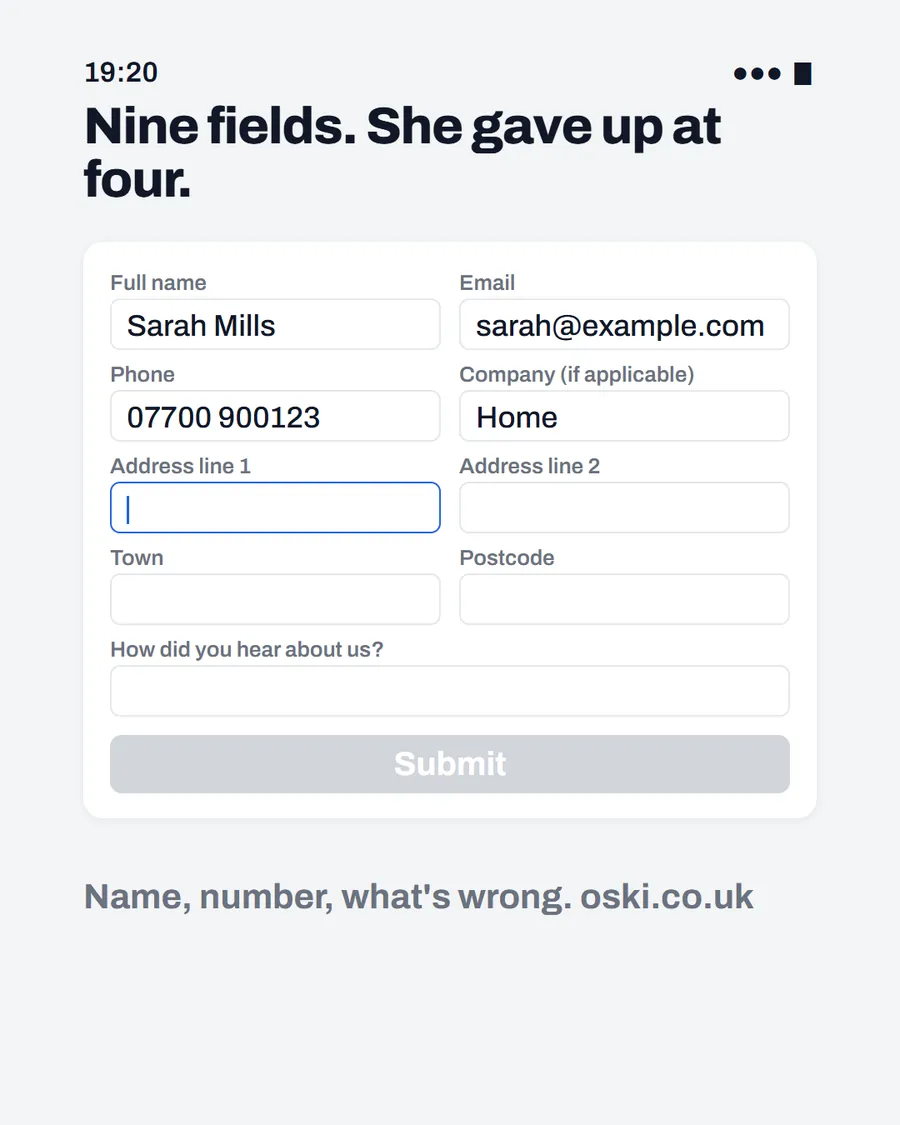
| What it shows | A contact form with nine fields, the first four filled in, a cursor on the fifth and a greyed-out Submit button, under the headline "Nine fields. She gave up at four." The form and person are examples. |
| Where it applies | Across the UK, with a focus on London and the South East, where we are based. It is aimed at small local businesses wherever customers search for them. |
| Why we published it | Many forms are built by copying a template, so owners never question the fields. The ad makes the problem visible. |
Why does the number of fields matter?
Because every field asks the customer to do work before they have got anything in return. They have a leaking tap and they want help, not a form to complete. The GOV.UK Design System guidance on question pages says to make sure you know why you are asking every question and only ask users for information you really need, and to ask for each piece of information only once.
That advice is written for government services, but it suits a plumber's contact form just as well. If you cannot say what you will do with a field, remove it.
Which fields do you actually need?
For most trades, three are enough. Others can be asked on the phone or in your first message.
| Field | Keep? | Why |
|---|---|---|
| Name | Yes | You need to know who to ask for |
| Phone number | Yes | The fastest way to help |
| What is the problem? | Yes | Lets you prepare and judge urgency |
| Optional | Useful if the customer prefers email | |
| Postcode or town | Optional | Quickly checks you cover the area |
| Full address | No | Ask when arranging the visit |
| Company name | No | Rarely relevant for home jobs |
| "How did you hear about us?" | Optional | Useful, but make it a single choice |
| Budget | No | Customers resist, and it can wait |
If you want to learn where enquiries come from, one optional question at the end is plenty.
What should the form tell people?
Say what happens next. A line such as "We will ring you back within the hour during working hours" sets expectations and encourages people to send. If you cannot promise that, say what you can: "We reply the same working day." After submission, show a clear confirmation message so the customer knows it went through, not a blank page.
Add a short line about how you will use their details and a link to your privacy policy, so customers know their information will not be shared. Keep the wording friendly and plain.
How should the form work on a phone?
Most customers will fill it in with a thumb. Check that the fields are big enough to tap, that the phone field opens a number pad, that labels stay visible and that the Submit button is not hidden by the keyboard. Avoid pop-ups and puzzles that are hard to complete on a small screen.
Also check the form is not the only route. A tappable number, as we explain in making your phone number tappable, gives customers who prefer not to type a quicker way in. Our broader guide on contact form best practice covers spam protection and where to place the form.
What happens to the form after someone sends it?
This is where many forms fail. The details go to an old email address, a shared inbox nobody checks, or a spam folder. A customer who sends a form at lunchtime and hears nothing by evening assumes you are not interested.
Send submissions to an address you check on your phone, with a notification that makes a sound. Reply fast, even with "Thanks, we will ring you this afternoon". Speed of reply is one of the strongest tiebreakers between two firms, as we describe in what missed calls cost.
How do you test the form each month?
On the first of each month, fill in your own form from your phone, using a name you will recognise. See how long the confirmation takes, whether the email arrives and who sees it. Then check how long it takes you to reply.
If the test fails, fix it before anything else. A form that does not work quietly loses enquiries, and you will only know if you check.
What about spam and fake enquiries?
Forms attract spam, and owners sometimes respond by adding more fields or puzzles that make the form harder for real customers. A better approach is to use a simple, invisible check that your website tool or developer can add, and to review the spam folder regularly. Keep the visible form short, and let the background protection do the work.
If you get a lot of junk, filter it rather than adding steps for everyone. A real customer with a burst pipe will not complete a puzzle.
Should the form let people attach a photo?
For trades, an optional photo field is one of the most useful additions. A picture of the leak, the boiler or the damaged roof lets you judge the job before you visit, and it saves a trip. Make it clearly optional, say which file types are accepted and keep the size limit generous so a phone photo goes through.
Do not make the customer upload anything to get a reply. Some people will prefer to send a photo later by WhatsApp or email, and that is fine.
What to do this week
- Open your contact form on your phone and count the fields.
- Cut it down to name, phone number and what the problem is, plus one optional extra.
- Add a sentence saying what happens next and when.
- Send a test enquiry and check it arrives where you will see it today.
- If you would like us to review your forms and contact routes, send us your web address.
Frequently asked questions
How many fields should a contact form have?
As few as you need to reply. For most trades that is three: name, phone number and a short description of the problem. Anything else can be asked on the phone or in your first reply.
Should I ask for the customer's address on the form?
Usually not on the first form. A town or postcode is enough to check you cover the area. Ask for the full address when you arrange the visit, once the customer has decided to go ahead.
Should the phone number be required?
For urgent trades, yes, because a call is the fastest way to help. For others, let the customer choose between phone and email, and make sure whichever they pick is answered quickly.
Do long forms put people off?
Government design guidance advises asking users only for information you really need, and asking for each piece only once. Each extra field is another reason to stop, so cut anything that does not help you reply.