Wrong Opening Hours on Google? How to Fix Them and Stop Losing Calls
Wrong opening hours on Google send customers to a rival, because someone who sees "Closed" at ten on a Tuesday taps the next result and never tells you. Fix them by editing your regular hours, adding special hours for holidays and short closures, and checking the listing on a phone once a month.
The ad at a glance
| Question | Answer |
|---|---|
| Who it is for | Tradespeople and local firms whose Google listing says they are closed when they are working, or open when they are not. |
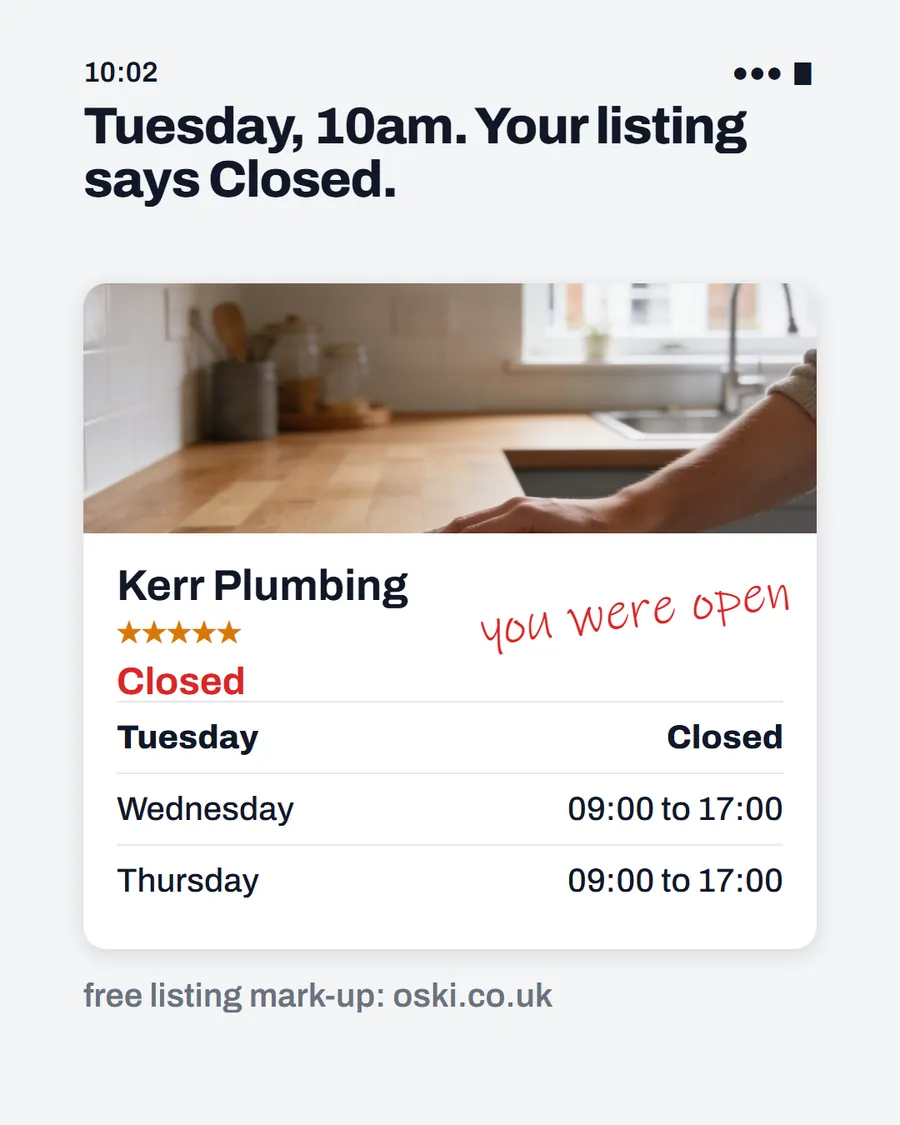
| What it shows | A business listing with a job photo, a red "Closed" label on a Tuesday morning, Wednesday and Thursday hours listed and a handwritten note saying "you were open", under the headline "Tuesday, 10am. Your listing says Closed." The firm is an example. |
| Where it applies | Across the UK, with a focus on London and the South East, where we are based. It is aimed at small local businesses wherever customers search for them. |
| Why we published it | Wrong hours are one of the cheapest listing problems to fix and one of the most costly to ignore, and an owner can check theirs in thirty seconds. |
Why do wrong hours cost you jobs?
They cost you twice. First, the customer who sees "Closed" when you are open goes elsewhere. You will not hear from them, so you will not know it happened. Second, the customer who rings during hours you listed and gets no answer feels let down and is less likely to try again.
Google describes business hours, including special hours, as part of the complete and accurate information that makes a business more likely to show up in local results, in its local ranking guidance. So accurate hours help you be seen as well as being chosen.
How do you change your regular hours?
Google's help page on editing hours covers the current steps, and the labels change from time to time. In outline:
- Sign in to the Google account that manages your Business Profile.
- Open your profile and choose Edit profile.
- Go to Hours and set the opening and closing time for each day.
- Save, then check the listing on a phone to see what customers see.
If you work irregular hours, pick the pattern that best describes your usual availability, and explain the rest in your business description.
How do you set bank holiday and short-closure hours?
Use special hours. According to Google's special hours page, you pick a date, confirm a suggested holiday or add a custom one, and set the open and close times or mark the day as closed. Google recommends confirming official holidays even if they match your regular hours, and notes that special hours are for short periods, with up to six days closed in a row.
| Situation | What to use |
|---|---|
| Bank holiday | Special hours for that date |
| One-day closure for training or illness | Special hours, closed |
| A week away or more | Mark the business as temporarily closed |
| Different hours for a service, such as call-outs | More hours, set after your regular hours |
Set special hours a week or two before the date, and put a reminder in your diary for December, Easter and the late-May and August bank holidays.
What about emergency and out-of-hours calls?
Be honest. If you only answer the phone from 8am to 6pm, list those hours and say in your description that you take emergency calls out of hours, with the number. If you genuinely answer at all hours, set it to open that way. Listing yourself as always open and then missing calls is worse than listing shorter hours and answering reliably.
Missed calls are costly in their own right. Our post on what missed calls cost a small business explains how to work out the damage and what to do about it.
How do you keep your hours right in the long run?
Hours go wrong when something changes and nobody remembers to update the listing. Add the listing to the same checklist as your invoice templates and van insurance. Check it on the first of each month, and again after you hire someone, move premises or change your working pattern.
Check your website and your social profiles as well. If the website says 8am and the listing says 9am, a customer will wonder which is right, and you will have taught them not to trust either. Our Google Business Profile checklist lists the other fields to keep consistent.
Who can change your hours?
Anyone with owner or manager access to the profile can edit it. Google's help page on owners and managers says a profile can have more than one owner and manager, and that managers have nearly the same access as owners but cannot add or remove users. Check who is on your list. If a former employee, a previous agency or an old web designer still has access, remove them, because a wrong edit from anyone on that list changes what customers see.
You should always be the owner, and anyone helping you with the listing only needs manager access.
What if your hours are right on Google but wrong elsewhere?
Customers see your hours in several places: your website, your Facebook page, directories and sometimes in older listings you forgot about. If those disagree, a customer is left guessing which is true. After you fix Google, search for your business name and check the first page of results, then update anything that is wrong.
Keep a single note with your correct hours, address and phone number, and copy from it whenever you update a listing. Our guide on consistent business details across listings explains why this consistency matters.
What to do this week
- Open your listing on your phone and read the hours for each day.
- Compare them with when you actually answer the phone and work.
- Correct them, then add special hours for the next bank holiday.
- If you take out-of-hours emergencies, add a sentence to your description with the number.
- Put a monthly reminder in your diary to check them again. If you would like us to look at the whole listing, send us your business name and town.
Frequently asked questions
How do I change my opening hours on Google?
Open your Business Profile, choose Edit profile, then Hours, and update your regular hours. The exact menu labels change over time, so follow Google's current help page if yours look different. Save the changes and check the listing on a phone.
How do I show bank holiday hours?
Use special hours. Google lets you confirm suggested holidays or add custom dates, and recommends confirming official holidays even if they match your normal hours. Special hours suit short changes, so set them a week or two ahead.
What if my business is closed for a long time?
Google says that if a business is closed for seven or more days in a row, or for an unknown period, you should mark it as temporarily closed rather than set special hours. Special hours are meant for shorter changes.
Should I list myself as open 24 hours if I take emergency calls?
Only if you genuinely answer at all hours. Otherwise list your real hours and say in your description that emergency calls are taken out of hours, with the number. Customers who ring and get no answer will not return.